- Intermediate
- 24 lessons
- ≈ 12 h
- Module 1 free, then $14.99
Make your sword combat game on Roblox
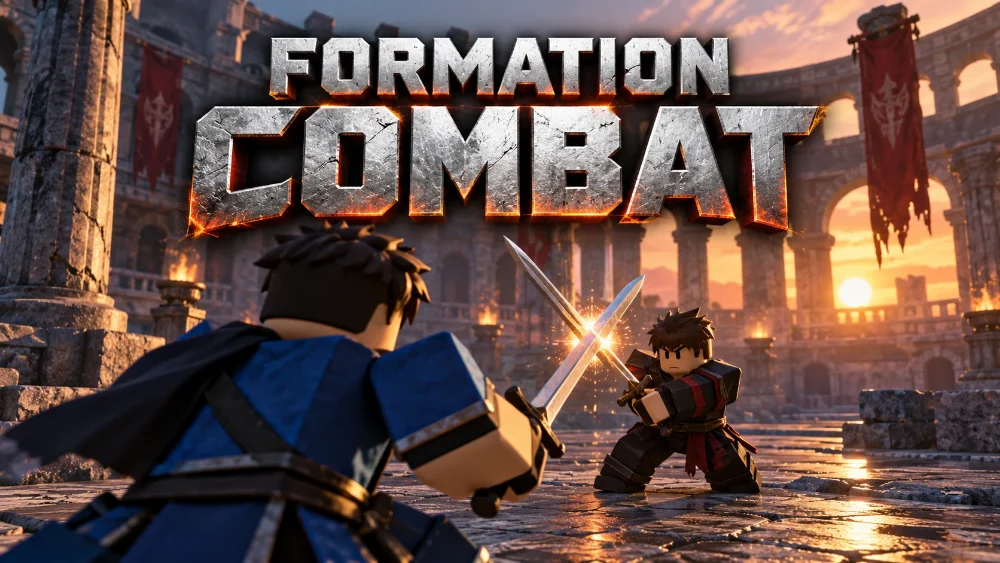
An arena, swords, and players facing off. You build a real sword fighting game: animations you create yourself, hits validated by the server to stop cheaters, a three-hit combo, blocking, a special skill, a health bar and a global leaderboard. At the end, your game is published on Roblox.
What you’ll build: The arena of blades
An arena with its pillars and spawn points, an animated sword, hitboxes checked by the server, a three-hit combo with knockback, blocking, the “whirlwind” skill with its cooldown, a health bar, damage numbers, a kill feed, a global leaderboard and a golden sword Game Pass, purely cosmetic. Published on Roblox.
By the end, you will know how to
- Create a sword and its attack animations in the Animation Editor
- Script fair hits: the client asks, the server checks and deals the damage
- Make every hit easy to read: health bar, damage numbers, kill feed
- Add a combo, blocking and a skill, then a global leaderboard and publishing
- Add classes, team rounds and combat that plays well on a phone
Course outline
6 modules, 24 lessons, about 12 h. Go at your own pace: every exercise is checked in Roblox Studio.
1Your sword Free
You discover what makes combat feel good, you build the arena, you forge your sword, you create its attack animation and you send your first attack from the client to the server.
Your sword Free
You discover what makes combat feel good, you build the arena, you forge your sword, you create its attack animation and you send your first attack from the client to the server.
- What makes a good combat gameLesson · 15 min
- Build the arenaIn Studio · 25 min
- Forge the swordIn Studio · 25 min
- An attack animationIn Studio · 30 min
- The client asks, the server decidesIn Studio · 25 min
- Module quizQuiz · 10 min
ConceptsReadabilityFairnessSpawnLocationToolWeldConstraintAnimation EditorAnimatorRemoteEventClient and server
2Hitboxes and damage
Your hits really land: a hit zone calculated by the server in front of the sword, damage, anti-cheat checks, and eliminations credited to the right player.
Hitboxes and damage
Your hits really land: a hit zone calculated by the server in front of the sword, damage, anti-cheat checks, and eliminations credited to the right player.
- Hit an opponentLesson · 15 min
- The hit zoneIn Studio · 30 min
- Stop the cheatersIn Studio · 25 min
- Eliminations and respawningIn Studio · 25 min
- Module quizQuiz · 10 min
ConceptsHitboxGetPartBoundsInBoxOverlapParamsTakeDamageAnti-cheatAttack rateForceFieldleaderstats
3Combat interface
Every hit can be seen and felt: a health bar that reacts, a red flash and a damage number on the target, an impact sound, and a kill feed for the whole server.
Combat interface
Every hit can be seen and felt: a health bar that reacts, a red flash and a damage number on the target, an impact sound, and a kill feed for the whole server.
- Your health barIn Studio · 25 min
- Hits you can seeIn Studio · 30 min
- The kill feedIn Studio · 25 min
- Module quizQuiz · 10 min
ConceptsScreenGuiHealthChangedColor3:LerpBillboardGuiHighlightFireAllClientsKill feed
4Combos and skills
Combat gets deeper: settings shared in a ModuleScript, a three-hit combo whose last hit knocks back, blocking from the front, and a skill with its cooldown, playable on mobile too.
Combos and skills
Combat gets deeper: settings shared in a ModuleScript, a three-hit combo whose last hit knocks back, blocking from the front, and a skill with its cooldown, playable on mobile too.
- Settings in a ModuleScriptIn Studio · 20 min
- A three-hit comboIn Studio · 30 min
- BlockingIn Studio · 25 min
- The whirlwind, a skillIn Studio · 30 min
- Module quizQuiz · 10 min
ConceptsModuleScriptrequireComboLinearVelocityBlockingContextActionServiceCooldownGetServerTimeNow
5Leaderboard and publishing
Your arena becomes a real online game: saved eliminations, a global leaderboard shown in the arena, a golden sword Game Pass that gives no advantage, then publishing.
Leaderboard and publishing
Your arena becomes a real online game: saved eliminations, a global leaderboard shown in the arena, a golden sword Game Pass that gives no advantage, then publishing.
- Save the eliminationsIn Studio · 25 min
- The global leaderboardIn Studio · 30 min
- A golden sword Game PassIn Studio · 25 min
- Publish your combat gameIn Studio · 20 min
- Module quizQuiz · 10 min
ConceptsDataStoreServiceOrderedDataStoreGetSortedAsyncMarketplaceServiceGame PassFairnessPublishing
6Classes, teams and mobile
Your arena becomes a real competitive game: classes to choose from, team rounds, combat that feels good on a phone and settings balanced with numbers.
Classes, teams and mobile
Your arena becomes a real competitive game: classes to choose from, team rounds, combat that feels good on a phone and settings balanced with numbers.
- Choose your fighter classIn Studio · 35 min
- Team roundsIn Studio · 40 min
- Combat that feels good on a phoneIn Studio · 30 min
- Balance with numbersIn Studio · 30 min
- Module quizQuiz · 10 min
ConceptsClassesModuleScriptTeamsTeamColorFriendly fireRoundsContextActionServiceTouch buttonsGetLastInputTypeUIScaleBalancing
How much does it cost?
Module 1 is free: you try before you pay. After that, a one-time payment, no subscription.
Combat
This whole course.
- Module 1 free to try
- 24 lessons, about 12 h
- Your game published on Roblox
Creator Pass
Every course, today’s and the ones to come.
- Every course, for life
- Courses you already paid for are deducted
- New courses included
Frequently asked questions
Do I need to know how to code?
No. The course builds on “Roblox Studio Basics”, which is free and teaches you everything you need before you start.
How long does it take?
24 lessons, about 12 h in total. Go at your own pace.
How much does it cost?
Module 1 is free. After that, $14.99 as a one-time payment, no subscription. Or the Creator Pass at $34.99 for every course (courses you already paid for are deducted).
What do I need?
A Windows or Mac computer with Roblox Studio, which is free, and a Roblox account. Roblox Studio doesn’t work on phones or tablets.
Will my game really be published?
Yes. You finish by publishing your game on Roblox, so your friends can play it.
The other courses
All courses-
- Beginner
- 27 lessons
- Free
Roblox Studio basics
Your first steps in Roblox Studio: you build, you test, then you write your first scripts and make your…
See the course -
- Beginner
- 21 lessons
- Module 1 free, then $14.99
Obby: your course in the sky
You build a 30-stage obby floating in the sky: jumps, checkpoints, traps, moving platforms,…
See the course -
- Beginner
- 24 lessons
- Module 1 free, then $14.99
Simulator: your pet game
You build a complete simulator: players collect coins, buy upgrades, open eggs, pets follow…
See the course
Start your combat game today
Module 1 is free: start your project tonight, no account needed to begin.
Try module 1 for free